
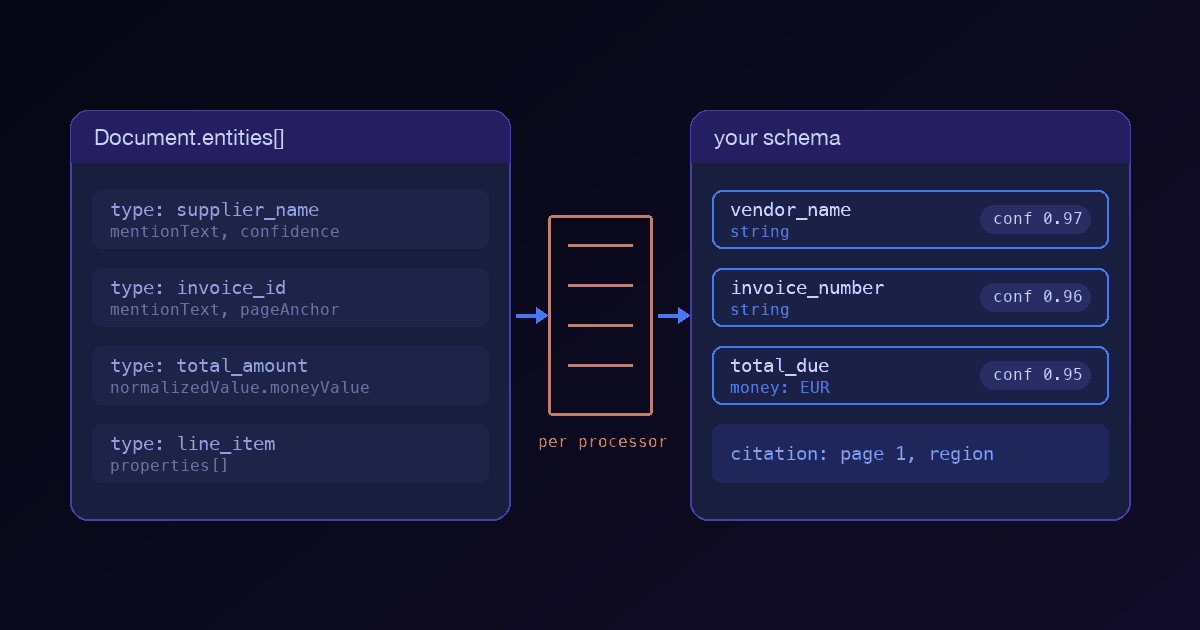
If your pipeline runs on Google Document AI, every result is a Document. Your code opens document.entities, loops over it, switches on each entity's type, and copies mentionText or normalizedValue into a column of your system of record. The types it switches on belong to the processor that produced them: supplier_name and line_item/amount from the Invoice Parser, other names from the Expense Parser, and whatever someone typed into the schema of a Custom Extractor.
That switch statement is what a Google Document AI migration moves. This piece maps the Document structure onto a schema you declare per document type, and points at the places where the translation goes wrong without raising an error.
Two entries in Google's release notes sent teams back to this code in 2026. On February 17, Google announced that legacy processors, among them versions of the W-9, 1099, US passport, and mortgage statement parsers, would be discontinued on June 30, 2026. On November 19, the Custom Extractor model pretrained-foundation-model-v3.1-lite-2026-10-08, powered by Gemini 3.1 Flash Lite, reached general availability with a short note: this processor version doesn't support fine-tuning. Either change means re-testing every reader of entities, so it is a natural moment to ask which contract that code should target.
What a Document carries
Google's API reference describes one Document per processed file. The parts a migration has to account for are these:
- Text —
text, the full text of the file. Entities and layout elements point into it through atextAnchorwhosetextSegmentseach carry astartIndexand anendIndex. - Pages —
pages, with blocks, paragraphs, lines, tokens, tables, and form fields. Each element has alayoutwith a bounding polygon and a confidence between 0 and 1. - Entities —
entities, each with atypefrom the processor's schema, thementionTextit was read as, aconfidence, apageAnchorpointing at the page and region, an optionalnormalizedValue, and nestedpropertiesfor children such as line items. - Shards —
shardInfo, present when batch processing split a large document into several output files.
A normalizedValue holds a text string plus at most one structured value: moneyValue, dateValue, datetimeValue, addressValue, booleanValue, integerValue, floatValue, or signatureValue. Each entity also carries a method: EXTRACT for a value read as-is from the text, DERIVE for one that was inferred and may not appear on the page at all.
Entity to schema field, row by row
The table below maps each construct to what your code does with it today and to what a field in a schema you declare carries instead. Field names on the right are illustrative.
| Document AI construct | What your code does today | What the schema field carries |
|---|---|---|
| Processor and processor version | Picks a mapper per processor, and per version when the entity set changes | A document type you name, with one schema per type. |
entities[].type such as supplier_name, invoice_id, total_amount | Renames processor types to your columns through one lookup table per processor | Fields named after your system of record, such as vendor_name or invoice_number. The lookup tables go away. |
mentionText next to normalizedValue | Prefers the normalized value, parses the mention when normalization is missing | One value, already in the type and format the schema declares. |
moneyValue with currencyCode, units, and nanos | Recombines units and nanos into a decimal amount | An amount and a currency as separate typed fields, each with its own evidence. |
properties[] under a parent such as line_item | Walks the tree and flattens children such as line_item/amount into rows | An array of objects with the properties your ledger expects. |
confidence per entity, a number from 0 to 1 | Compares against a threshold to flag review | A confidence per field. The example on our extraction API page shows 0.99: the range looks the same, the calibration is not. |
pageAnchor.pageRefs and textAnchor.textSegments | Draws highlights from polygons, slices text by index | A citation per field: the page and the region the value came from. |
Four places a migration breaks quietly
None of these throws an error. Each produces a plausible value that is wrong.
- Page zero is a missing key —
pageRefs[].pageis a zero-based index intopages, and Google's reference notes that the field is skipped when its value is the default0, following proto3 JSON rules. A reader that treats the missing key as an error drops every first-page citation; one that defaults it to 1 cites the second page. Default it to zero, and convert to a human page number in one place. - Large integers arrive as strings —
startIndex,endIndex, and theunitsof amoneyValueare int64 values, which proto3 JSON encodes as strings. Code that concatenates instead of adding, or sorts lexically, slices the wrong text. Money also splits the fraction intonanos, billionths of a unit: 1,234.50 arrives asunits: "1234"andnanos: 500000000. - Normalization is optional — the reference says
normalizedValueis absent when a value could not be converted or the type is not supported for that parser. A mapper that writes null wheneverdateValueis missing loses dates thementionTexthad. Decide per field whether a missing normalization goes to review or to a parser you own. - Shards cut the text — for a large document in batch output, entities may cross shard boundaries and text indices may fall outside the shard's own
text;shardInfocarries the offset. Code tested on short samples breaks first on the longest files.
The method field adds a smaller fifth case. A review screen that shows mentionText as the evidence for every entity shows nothing useful for a DERIVE value. Decide what evidence an inferred value gets before you compare outputs.
What the 3.1 Lite release changes for custom extractors
Google's Custom Extractor works in three modes. Zero-shot needs only the schema. Few-shot works from about five labeled documents. Fine-tuning needs at least 50 training and 50 test documents, and each job can take hours, with a 72-hour timeout. The Gemini 3.1 Flash Lite version in general availability sits outside the third mode, while the July preview of the same model still supports it.
For a team on the GA version, the levers left are in the schema: field names, data types, occurrence, and property descriptions. Google's documentation says generative models use the field name and description to form the underlying prompt, which makes those names semantically critical. That is the same lever a schema-based extraction gives you, and it is portable: a field list with descriptions moves between services in a way a tuned version does not.
Tuned versions are bound to their base. Google's page on processor versions walks through the case: when the base version behind a fine-tuned default is deprecated, the processor's default moves to the newest stable Google version unless you fine-tune again on it. Requests that pin a deprecated version ID fail. So whichever way you go, the durable assets are the processor schema and the labeled documents in its dataset. The first is the draft of your new schema; the second is your test set.
What migrates is the mapper, not the processor
List every place in your code that reads a Document. In most pipelines the list falls into five groups:
- Processor routing — which processor and version each document type goes to, including any classifier or splitter in front of the extractors. Record the version on every stored result.
- Type maps — the lookups from entity
typeto your columns, one per processor. With a schema in your own names they are deleted. - Normalizers — the code that recombines money, builds dates, and falls back to
mentionText. Some of it moves into the schema's types. Keep the business rules that are yours, such as which amount counts as the total due. - Review thresholds — the numbers that decide what a person sees. Both sides publish confidence from 0 to 1, which makes it tempting to keep them. Set them again from your own review data instead.
- Evidence and audit — stored anchors and polygons. Records that cite Document AI anchors keep meaning only if you keep the original
DocumentJSON with them. Decide whether history stays as it was or is re-extracted before the first document takes the new path.
Run both on the same documents
Compare the value your system stores after your mapper has run against the value the schema returns. Comparing raw text, or comparing processor entity types to anything, measures the wrong thing.
- Use your own documents — the ones that already reach review, plus the test set from your Custom Extractor dataset.
- Run in shadow — keep Document AI on the live path, write the new output to a side table, and diff field by field.
- Record review effort — for each document, which fields each path would have sent to a person, and why.
- Read every disagreement — some are errors on the new side; others are type-map entries that were wrong all along.
Our document extraction benchmark guide describes the method. We cite no accuracy figures here: the only ones worth having come from your documents.
When staying on Google Document AI is the better call
Not every pipeline should leave. If your documents fit the pretrained processors, if you need Google Cloud's compliance footprint, or if your data and IAM already live in GCP, moving off legacy processors to current versions may be all the migration you need. A hybrid is reasonable too: keep Document AI for OCR or layout parsing, and add a schema-based extraction step where your own field names and review routing matter. Our Google Document AI comparison sets out where each fits.
If you are migrating more than one service, the shape of the work differs. Textract returns blocks your code assembles into fields, Azure returns fields your code renames, and Document AI returns entities your code walks, once per processor. Our pieces on the AWS Textract migration and the Azure Document Intelligence migration cover the other two.
Before you switch the live path
- An inventory of Document readers — every function that reads
entities,pages, or anchors, sorted into the five groups above. - A schema per document type — written from your system of record, using processor schemas and Custom Extractor field lists as a draft.
- The encodings written down — zero-based page indexes, int64 values as strings, money as units and nanos, and shard offsets.
- Thresholds set from shadow data — per field, not carried over because the range matches.
- A rollback — the Document AI path stays deployable until the shadow diff is quiet for long enough to trust.