
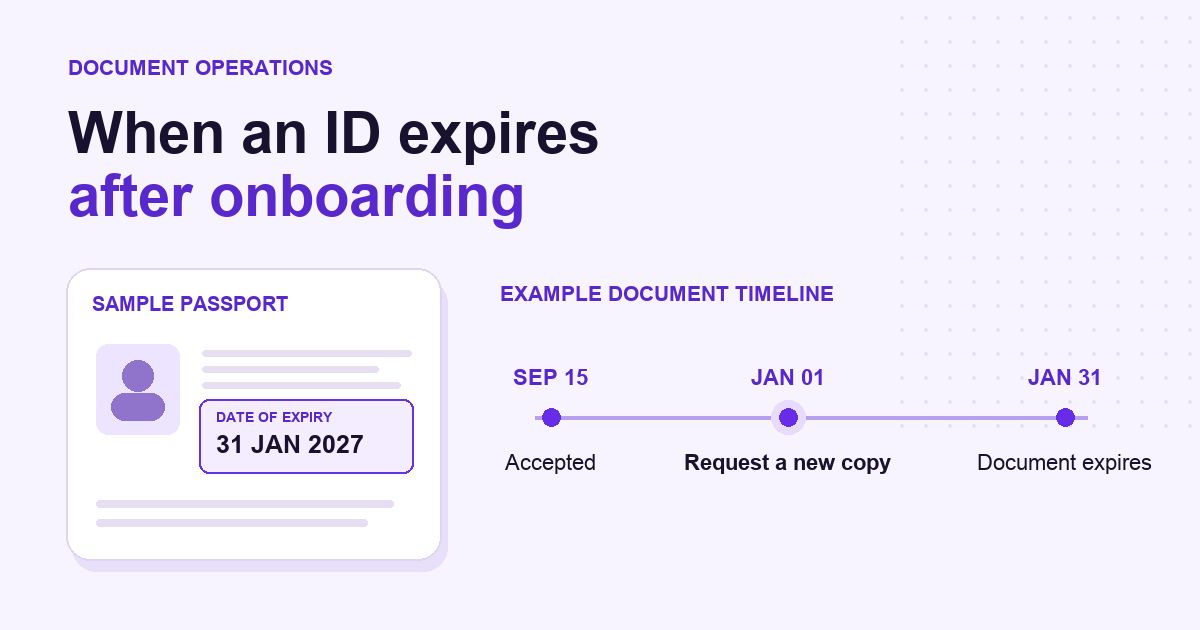
A customer opens an account on September 15, 2026 with a passport that expires on January 31, 2027. Onboarding finishes with a document that is current on the day it is checked. The expiry date gives the team a separate decision to make later: when to ask for a new copy, how to review it, and what to do if the old document reaches expiry first.
Store the date printed on the document, the evidence that supports it, and the action your policy calls for. This lets an operations team request a replacement while the current document is still within its validity period.
Record the date and the region
Read the expiry label and its value together. On a crowded identity card, the date of birth, issue date, and expiry date may sit within a few lines. Keep the original reading, the document version and page or side, and the region containing both label and value. After review, keep a normalized date such as 2027-01-31 alongside that evidence.
The Cogneris KYC document guide shows expiryDate as an extracted field with a confidence value. The document verification API page describes evaluating field readings with blurry, cropped, and expired documents. Define separately how your workflow treats an uncertain value and who can confirm it.
Leave the date unset when the region is cropped, the value is unreadable, or the document has no printed expiry. Record the reason. A reviewer can seek a clearer image or confirm that the document type does not carry a printed date. That decision determines whether a date-based reminder applies.
Recollect under your own policy
In this fictional workflow, an analyst reviews the document at onboarding. For an accepted document, the team opens a replacement window 30 calendar days before the confirmed expiry date. That window belongs to the example team. The team sets its own lead time, escalation rules, and handling for each document type.
| Document | Expiry and source region | Collection window | Action |
|---|---|---|---|
| Passport current at onboarding | Data page, date of expiry field | Opens | Request a current document when the window opens. Review it before updating the record. |
| ID card already expired at onboarding | Front, expiration field | Immediate during onboarding | Ask for a current document and refer the existing submission to onboarding review. |
| ID card with a cropped expiry field | Unresolved Front image ends before the expiry value | Pending a confirmed date | Send the image for review. Ask for a complete image if the value remains unavailable. |
Link the replacement to the existing case, review its source fields, and calculate the next window from the newly confirmed date. Keep the earlier document decision in the case history. If the January 31 passport reaches expiry before an acceptable replacement arrives, route the case for the escalation your policy prescribes.
Document expiry and later risk
Document currency is one part of KYC after onboarding. In the Asia-Pacific findings from Sumsub’s Identity Fraud Report 2026–2027, about one-third of the detected fraud-network links among approved people who were linked to such a network surfaced after they had passed identity verification. Sumsub published the regional finding on November 18, 2026 and describes a network link as a risk signal. The finding concerns when those signals appeared. An ID’s expiry date describes the document’s validity period.
In this workflow the follow-up concerns a document collected for an existing customer record. A hospitality desk may capture passport details at check-in, and an insurance team may track a coverage end date to request a new certificate. Here the decision is when an approved customer needs to supply current identity evidence.
Test the workflow with an accepted document approaching expiry, a document expired at intake, and a cropped field. For each case, verify that a reviewer can locate the evidence and that the action follows from the confirmed date and the stage of review.