
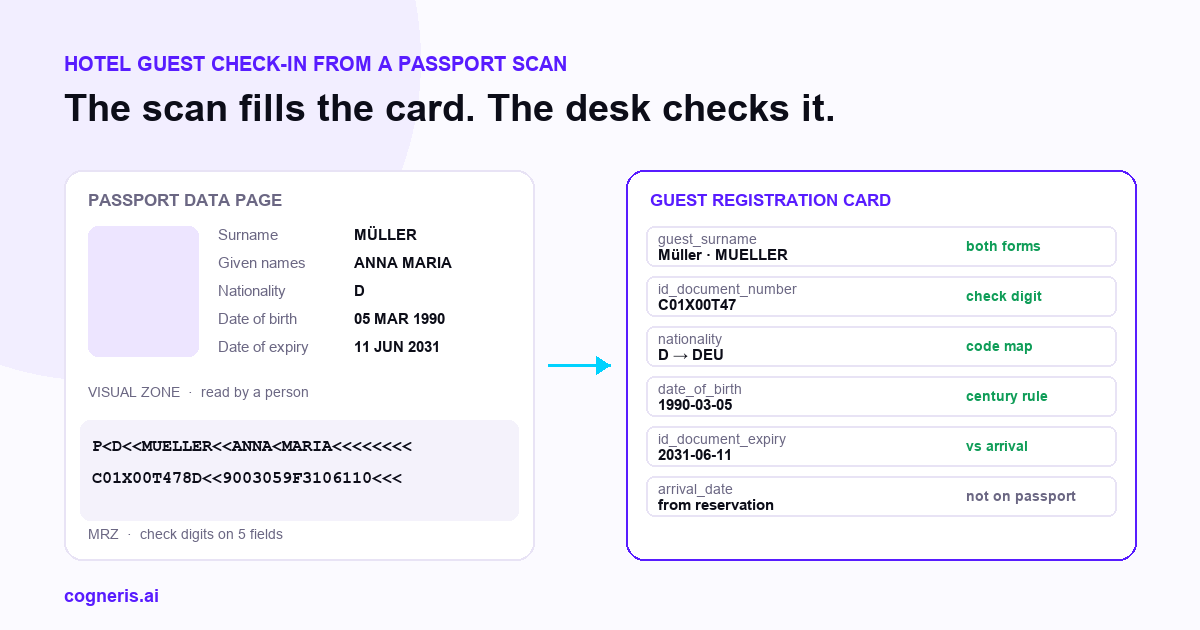
It is 23:40 and three guests from the same late flight are at the front desk. Each hands over a passport. For each one, the night auditor types a surname, given names, a passport number, a nationality, a date of birth and an expiry date into the guest registration card, then checks the screen against the booklet. Six fields, three guests, one person, and the queue behind them is growing.
A passport scan can fill those fields. What it cannot do is decide that they are right. Hotel guest check-in from a passport scan moves the desk's work from typing to checking, and the design question is which checks the system runs on its own and which ones still need a person.
What the passport can fill, and what it cannot
The data page of a passport carries identity facts. The registration card carries identity facts and facts about the stay. Only the first group comes from the scan.
- From the passport — surname, given names, document number, nationality, date of birth, sex, date of expiry, issuing state and document type. These are printed twice: once in the visual inspection zone (VIZ) a person reads, and once in the machine readable zone (MRZ), the two lines of angle brackets at the bottom of the page.
- From the reservation — arrival and departure dates, room, rate, number of guests and billing details. A passport says nothing about them, and a scan should not pretend to fill them.
- From the guest — home address, contact details and, where the property asks for them, purpose of stay or a signature. Many passports print no address at all.
Keeping those three sources apart in the record matters later, when a field is wrong and someone needs to know whether to fix the scan, the booking or the form.
Field by field: passport to guest record
The table below maps each passport field to a field on the guest record and to the check that runs before the value is accepted. Field names are illustrative; your property-management system (PMS) will use its own.
| Passport field | Guest record field | Check before it is accepted |
|---|---|---|
| Surname and given names (VIZ and MRZ) | guest_surname, guest_given_names | Compare the VIZ name with the MRZ name after transliteration; keep both forms. No check digit covers the name. |
| Document number | id_document_number | MRZ check digit, then compare with the number printed in the VIZ. |
| Nationality | nationality | Three-letter code from the MRZ, mapped to the PMS country list. ICAO codes are mostly ISO 3166-1 alpha-3 but not always: Germany is D. |
| Date of birth | date_of_birth | Check digit, then a century rule: the MRZ prints YYMMDD, so 05 can mean 1905 or 2005. |
| Date of expiry | id_document_expiry | Check digit, then compare with the arrival date. A document that expires before arrival goes to the desk, not into the record. |
| Sex | sex | Value is F, M or < (unspecified). Store what is printed; do not infer it. |
| Issuing state and document type | id_issuing_country, id_document_type | Codes from the MRZ. The issuing state can differ from nationality, for example on a travel document issued to a refugee. |
Every row has a source on the page, and the record should keep it: which zone the value came from, where on the image, and how confident the read was. When a value is challenged at checkout or in an audit, that is the evidence.
Names that do not fit the machine readable zone
The MRZ has a small alphabet: the letters A to Z, the digits 0 to 9 and the filler character <. A name written with diacritics, or in Cyrillic, Greek, Arabic or Chinese script, reaches the MRZ only after transliteration under the rules in ICAO Doc 9303, Part 3, or the issuing state's own practice. On a passport, the name field also has a fixed length of 39 positions, so long names are truncated.
The VIZ is under no such limit. It can show the name in the national script, a Latin form, or both. That gives the guest record two honest versions of one name, and neither is an error:
- The MRZ form — uppercase Latin, possibly truncated. Use it to match a returning guest or to compare against a booking made under the passport name.
- The VIZ form — the name as the guest writes it. Use it on the registration card, the folio and any letter the guest will read.
The mistake to avoid is "fixing" one into the other. Writing MUELLER back over Müller, or dropping the second half of a truncated name, creates a record that matches neither the document nor the guest.
A check digit that passes is not an identity check
MRZ check digits are worth computing, and the hospitality page of this site lists MRZ checksum validation among the structural checks Cogneris runs on ICAO 9303 passports. A passing digit proves one narrow thing: the characters read in that field agree with the digit printed next to them. As our piece on MRZ check digits and the visual zone explains, it does not cover the name, and it does not prove the characters are the ones the issuer printed.
It proves even less about whether the passport is genuine. Our article on AI-generated document fraud describes forged identity documents whose MRZ checks out because the model that drew them learned the checksum. For check-in, treat the digits as a reading check. Whether the person at the desk is the person in the photograph, and whether the document is authentic, is a decision for the property's own procedure.
What the reading checks do well is route the exceptions. A failed digit, a VIZ value that disagrees with the MRZ, or an expired document should reach the desk with the image region attached, so the auditor looks at one field instead of retyping six.
Into the PMS: map once, per property
Cogneris provides REST APIs and signed webhooks for custom integrations with property-management systems. Vendor-specific field mapping, write-back and delivery timelines are scoped per implementation; there is no generic connector that already knows how your PMS names its profile fields. In practice the integration has three parts:
- Verify the delivery — check the webhook signature before any value is written, so a forged request cannot create or edit a guest profile.
- Map the fields — translate the extraction schema to the PMS profile once, including the country list and date formats, and version that mapping like code.
- Match before you write — a returning guest already has a profile. Match on document number and date of birth, and ask the desk before overwriting an existing record with a new passport.
How long the copy stays
The passport image and the extracted fields are personal data, and the reason for holding them is narrow. Which fields a property must record, and for how long, depends on the rules where it operates, so confirm them with the applicable authority or counsel rather than with a vendor page.
On the extraction side, retention in Cogneris is configurable per regulatory regime. The hospitality FAQ states a default of 7 days after checkout for EU guest data and a range down to zero, meaning nothing is kept beyond the request. Set it to the shortest period the property's own obligations allow, and keep the image no longer than the fields need it.
Before the first guest is scanned
- Source per field — every guest record field says whether it came from the passport, the reservation or the guest.
- Both name forms — the MRZ and VIZ names are stored side by side, never merged.
- Exceptions with evidence — failed digits, zone mismatches and expired documents reach the desk with the image region, not as a blank field.
- A written retention period — for the image and the fields, checked against local rules before go-live.
Not every guest carries a passport. For US guests checking in with a state ID, there is no MRZ to compare against; see driver's license OCR across state layouts. And when the same guest leaves, the document that matters is the bill: hotel folio OCR covers reading it line by line.