
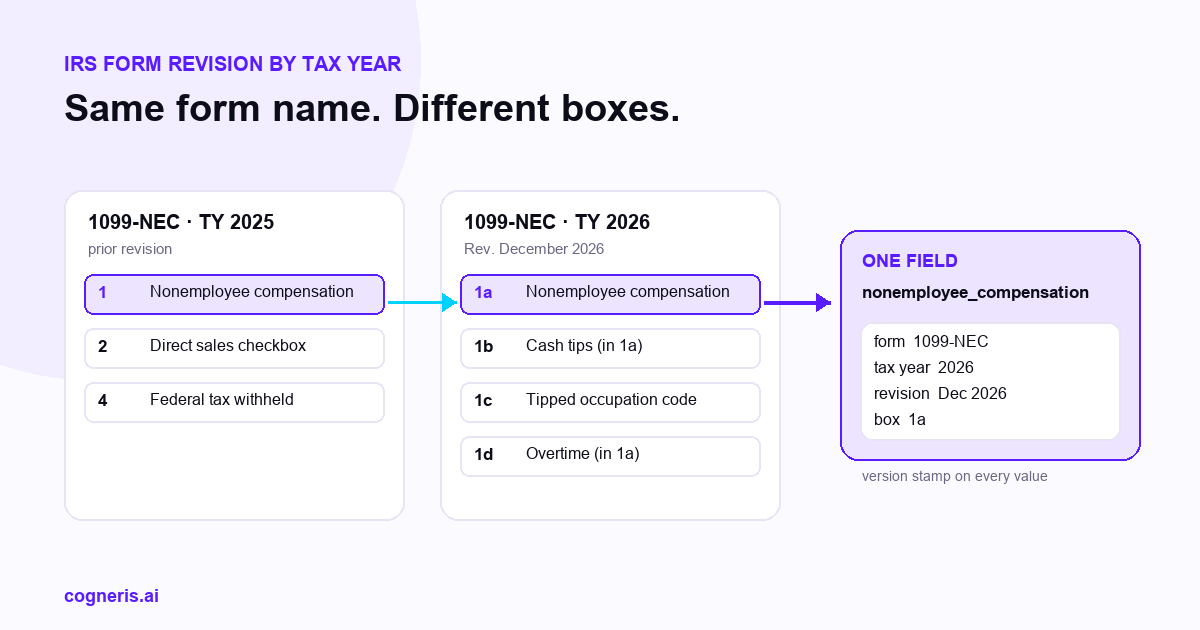
A contractor's Form 1099-NEC for tax year 2025 reports $48,200.00 in box 1, nonemployee compensation. The same contractor's form for tax year 2026, printed on the December 2026 revision, reports $51,600.00 in box 1a and $3,900.00 in a new box 1d. A pipeline that reads "box 1" by position from both years will either miss the 2026 figure or add box 1d on top of it. Both answers are wrong, and neither looks wrong in a spreadsheet.
The form did not get harder to read. It changed. IRS forms are revised, boxes are added, renumbered, or repurposed, and an extractor that treats a form name as a fixed layout will keep returning values long after they stopped meaning what the column header says.
A form name is not a layout
"Form 1099-NEC" names a family of revisions, not one document. The IRS publishes a current revision for each form and keeps an archive of earlier ones, linked from each form's About Form 1099-NEC page as All Form 1099-NEC Revisions. Some forms are annual and carry the tax year in their title. Others are continuous-use: one revision is used for several years until the IRS issues a superseding revision.
The current Instructions for Forms 1099-MISC and 1099-NEC say it plainly: use the December 2026 revision to report 2026 information, continue to use it for later years until a superseding revision is issued, and do not use it for prior years. A revision has a start year and, eventually, an end year. Which layout a document follows is a fact about that document, and the extraction should record it.
The same field, two years apart
The December 2026 revision of Form 1099-NEC renames box 1 to box 1a, nonemployee compensation, and adds three boxes under it: 1b for cash tips, 1c for the Treasury Tipped Occupation Code, and 1d for qualified overtime compensation. The instructions are explicit that the amounts in 1b and 1d are included in box 1a. They are breakdowns, not additions.
This is what the same field looks like from two years of filings when each extraction carries the revision it was read against. The amounts and stamp values are illustrative.
| Tax year | Form revision | Box read | Field | Value |
|---|---|---|---|---|
| 2025 | 1099-NEC, prior revision | 1 | nonemployee_compensation | $48,200.00 |
| 2026 | 1099-NEC, Rev. December 2026 | 1a | nonemployee_compensation | $51,600.00 |
| 2026 | 1099-NEC, Rev. December 2026 | 1d | overtime_compensation (included in 1a) | $3,900.00 |
With the revision stamp on every row, the comparison is a join on the field name, not on the box number. The year-over-year change is $3,400.00, not $7,300.00, and the overtime figure is available as its own value instead of being folded into the total or counted twice.
This is not the first time a box moved. Through tax year 2019, nonemployee compensation was reported in box 7 of Form 1099-MISC. From tax year 2020 it moved to the reintroduced Form 1099-NEC, and box 7 of Form 1099-MISC now marks direct sales of $5,000 or more. A 2019 and a 2023 Form 1099-MISC both have a box 7, and the two boxes report different things.
Pin the template to the tax year
The safe rule is to choose the extraction template from the tax year and revision on the document, not from the form name alone. Cogneris version-pins form templates per tax year: when the IRS publishes a revision, a new extractor ships for it, tax year 2025 forms are supported out of the box, and tax year 2026 drafts are added as the IRS releases them, as described on the accounting solutions page.
Pinning matters most at the edges of a revision:
- Late and corrected filings — a corrected 2025 form arriving in 2027 is still a 2025 form and should be read against the 2025 layout, whatever the current revision is.
- Prior-year returns — loan and engagement files routinely include two or three years of forms at once, each on its own revision. We cover how those years are compared in three years of returns, one visible trend.
- Drafts — a draft revision can still change before release. A figure read from a draft layout should be marked as such until the final revision is published.
Stamp the version on every extraction
Pinning chooses the right template. The stamp proves afterwards which one was used. Cogneris shows a per-form version stamp on every extraction, so a reviewer can tell which template revision produced a given figure. A useful stamp records at least:
- Form and revision — the form number and the revision the document follows, as printed on the form.
- Tax year — read from the document, not assumed from the date it was received.
- Template version — the extractor version that read it, so a later fix to the template does not silently rewrite old results.
- Box to field mapping — which printed box fed which output field, so "box 1" and "box 1a" both resolve to the same named value.
That record is what a preparer or reviewer needs when a number changes between years. It is the same discipline as pointing every workpaper number to a document: the value, the page it came from, and the version of the reading that produced it.
When the revision is not clear
Not every document makes its revision obvious. Substitute statements from payroll providers, scanned copies with a cropped header, and forms printed from software that omits the revision line all arrive in practice. When the tax year or revision cannot be read with confidence, the document should go to review before its values are mapped, not after they have been compared with last year. A wrong layout produces confident, well-formatted, wrong fields.
The same applies when a document's layout does not match the revision it claims, for example a 2026 form missing the new boxes. That is a question for a person, and the extraction should say which boxes it expected and did not find.
What this does not change
Version pinning keeps extracted values comparable across years. It does not decide how a figure should be reported or whether a payment belongs on a given form; those are tax questions for the preparer.
This article describes how form revisions affect document extraction; it is not tax advice. Box definitions and filing rules come from the IRS form instructions for the relevant year.