
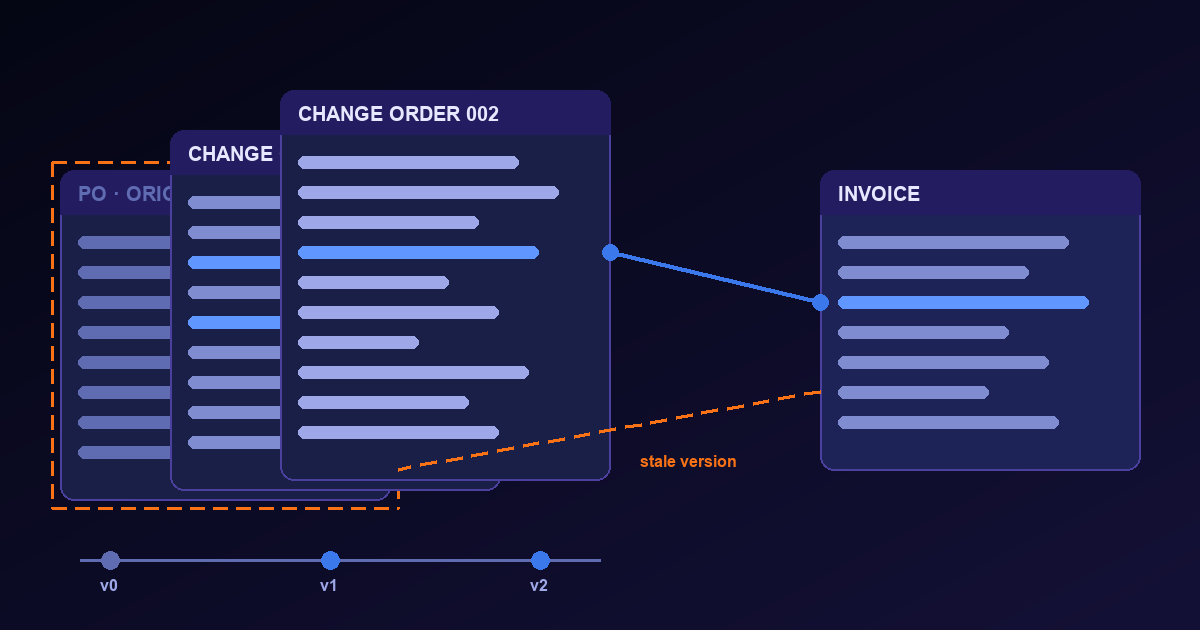
Purchase order matching is usually described as a comparison between two documents: the invoice the supplier sent and the order the buyer issued. The description hides a third object. The order the buyer issued is often not the order that is in force. Between the day a purchase order goes out and the day its invoice arrives, quantities are cut, prices are renegotiated, lines are added, delivery dates slip and ship-to addresses move. Each of those changes produces a new version of the same order, almost always under the same order number.
An extraction that reads the order number and stops there will pick whichever version it saw first, or last, or whichever one happened to be attached to the email. Matched against the wrong version, a correct invoice fails on lines that are right, and an incorrect invoice passes on lines that were cancelled weeks ago. Neither failure looks like an extraction error, because every field was read correctly. The mistake is in which document the fields were read from.
This piece treats a purchase order as a sequence of versions and asks what an extraction has to capture so that matching can pick the right one. The structural rules come from two public sources that describe ordering in detail: the OASIS Universal Business Language (UBL) 2.1 specification, whose ordering process defines how an order is changed and answered, and the US Federal Acquisition Regulation (FAR), whose Part 43 governs how government contracts and orders are modified. Neither is the rulebook for a private company’s procurement, but together they name the distinctions that every ordering system has to make, in words precise enough to build a schema on.
A purchase order is a sequence, not a document
UBL 2.1 describes ordering as an exchange of five document types: Order, Order Response, Order Response Simple, Order Change and Order Cancellation. The buyer sends the order. The seller either confirms it without change, rejects it, or answers with a full Order Response proposing different prices, dates, discounts or substitutes. Section 2.6.4 then gives the buyer two ways to change an established order: send an Order Change, or send an Order Cancellation followed by a new, complete replacement order.
Three consequences follow, and each one is something an extraction has to see:
- The same order number can name several documents — the original, one or more changes, and possibly a seller response that proposed its own version.
- A replacement order may carry a new number — when the buyer cancels and reissues, the link between the two orders lives in a reference field or in a note, not in the number.
- Not every version is agreed — UBL lets the seller accept or reject an Order Change, so a change the buyer sent is a proposal until the response says otherwise.
Paper and PDF orders follow the same logic with less structure. A revised order prints “Revision 2” or “Change Order 003” somewhere near the header, a change date beside the original order date, and sometimes a marker on each changed line. Those markers are small, they move between templates, and they are exactly the fields a generic order extraction leaves out.
Full state or delta: read which one you were sent
The most consequential distinction is easy to miss. UBL is explicit that an Order Change “reflects the entire current state of an order transaction,” and it says the same of the seller’s Order Response, which proposes to replace the original order. Under that model every version is complete. The latest agreed version is the order; earlier versions are history.
Many printed change notices work the other way. They list only what changed: line 2 quantity from 100 to 80, line 4 added, line 6 cancelled, delivery date moved. Everything not mentioned is still governed by the version before. Read as if it were complete, a delta notice makes every unmentioned line disappear, and the next invoice fails on lines nobody changed. Read as if it were a delta, a full-state change double-counts lines that were already there.
So the first field an extraction of a revised order should return is not a number at all. It is the document’s kind: original order, full replacement, change notice listing deltas, cancellation, or seller response. That classification decides how every other field on the page is applied, and it should come with the words on the page that justify it, such as a heading that says “Change Order” or a line that says “all other terms remain unchanged.”
What changes, and what the match has to use
The UBL text lists typical reasons a buyer changes an accepted order: the ordered items, the quantity, the delivery date, the ship-to address. Prices and terms change too, usually through the seller’s response or a negotiated amendment. Each kind of change breaks a different part of matching when the old version is used:
| What changed | What the invoice match must use | What happens if the old version is used |
|---|---|---|
| Unit price | The price on the version in force when the goods shipped or the service was performed | A correct invoice raises a price variance; an overcharge at the old price passes |
| Quantity reduced | The reduced quantity, as the ceiling for what can be billed on that line | An invoice for the original quantity passes, paying for goods that were cut |
| Line added | The added line, with its own price and quantity | A legitimate invoice line has nothing to match and lands in an exception queue |
| Line cancelled | The cancellation, so the line accepts no further billing | An invoice for a cancelled line matches the original and is paid |
| Delivery date | The revised date, which decides late-delivery terms and the effective version | On-time shipments look late, or late ones look on time |
| Ship-to address | The revised address, which receipts are checked against | The goods receipt at the new site appears to belong to no order line |
| Payment terms or currency | The terms on the agreed version | Discount dates and amounts due are computed from terms that no longer apply |
The table has one pattern running through it. In every row the failure is silent at extraction time and visible only at matching or payment, when the person resolving the exception has to work out which version the supplier was billing against. That work is cheap if the extraction kept every version with its kind, number and dates. It is slow if the system only kept one.
The version rule: in force, not latest
The tempting rule is to match every invoice against the newest version of the order. It is wrong often enough to matter, because orders change while they are being fulfilled. Goods that shipped before a price change were sold at the old price. A partial delivery made before a quantity cut is still owed. The question matching has to ask is not which version is newest but which version governed the line being billed.
Answering it needs two dates on each version, and they are not always the same date. FAR 43.101 shows why. For a change order, the effective date is the issue date of the change order. For a supplemental agreement, the effective date is the date the contracting parties agreed upon, which can be earlier or later than the day the document was signed or received. A private order follows whatever its own terms say, but the distinction carries over: the date printed at the top of a revision is not necessarily the date from which it applies.
A workable rule, stated so a reviewer can check it:
- Candidate versions — every version of the order the supplier accepted, or that the agreement makes binding without acceptance.
- Governing version — among those, the latest one whose effective date is on or before the shipment or service date of the invoiced line.
- Fallback — when the invoice gives no shipment date and the receipt gives none either, flag the line for review instead of defaulting to the newest version.
The rule does not decide anything an agreement decides differently. Some buyers apply price changes only to undelivered quantities; some apply them to everything not yet invoiced. What the rule does is make the choice explicit, so that when an exception is raised, the record shows which version was used and why.
A worked example
Take a single order issued on March 1 for two lines: 100 brackets at 42.00 each and 40 mounting kits at 18.50 each, delivery by March 20. On March 6 the supplier ships 20 brackets early. On March 10 the buyer issues Change Order 001, effective on issue, which cuts brackets to 80, raises their price to 44.50 after a material surcharge the supplier requested, and adds a third line for 1 freight charge at 260.00. The supplier accepts it on March 11. Two invoices follow:
| Invoice line | Shipped | Governing version | Matched against the original | Matched against the governing version |
|---|---|---|---|---|
| Invoice A: 20 brackets at 42.00 | March 6 | Original order | Match | Match |
| Invoice B: 60 brackets at 44.50 | March 17 | Change Order 001 | Price variance of 2.50 per unit | Match: 20 + 60 reaches the revised 80 |
| Invoice B: 1 freight at 260.00 | March 17 | Change Order 001 | No order line exists | Match on the added line |
| Invoice B: 40 mounting kits at 18.50 | March 17 | Change Order 001, unchanged line | Match | Match, provided the change notice was read as a delta |
Matched against the newest version alone, invoice A raises a false variance: the supplier billed the early shipment at the price that applied when it shipped. Matched against the original alone, invoice B raises two false exceptions. And if the change order was a delta notice that never mentioned the mounting kits, reading it as a full replacement would have cancelled line 2 and turned the last row into a fourth false exception. Every field in this example can be read perfectly and still be matched wrong.
The cumulative check matters as much as the per-line one. Invoice B’s brackets match only because invoice A’s 20 are counted against the same line. A third invoice for 20 more brackets at 44.50 should fail, even though each of its fields agrees with the change order, because the revised quantity is already fully billed.
Unilateral and bilateral changes are different evidence
FAR 43.103 divides contract modifications into two kinds. A bilateral modification, which the FAR also calls a supplemental agreement, is signed by both the contractor and the contracting officer. A unilateral modification is signed only by the contracting officer and is used, among other things, to make administrative changes and to issue change orders. FAR 43.201 adds that change orders, which are made within the general scope of the contract, are generally issued in writing on Standard Form 30.
Commercial orders draw the same line informally. A buyer can send a change on its own letterhead; whether the supplier countersigned it, acknowledged it electronically, or simply started invoicing against it is a separate fact. For extraction, that fact is a field: who signed the version, whether an acknowledgement exists, and on what date. A version only the buyer signed may still bind under the agreement, or it may be a proposal the supplier never accepted. The extraction cannot decide which. It can make sure the person deciding sees the signatures and the acknowledgement next to the changed lines.
The FAR also shows why a change can arrive without a price. The fixed-price changes clause, FAR 52.243-1, lets the contracting officer change specified elements by written order and then requires an equitable adjustment in the contract price, the delivery schedule, or both, when the change affects cost or time. The contractor has 30 days from receiving the written order to assert its right to that adjustment. In practice the order that changes the scope can precede the modification that settles the price by weeks. An extraction should therefore record a changed line with no new price as exactly that, an open price, and never fill it in from the previous version.
Blanket orders are drawn down, not matched once
A blanket order, or blanket purchase agreement, adds a second layer of versions. FAR 13.303-1 describes a BPA as a simplified method of filling anticipated repetitive needs by establishing “charge accounts” with qualified sources, and it notes that using one does not exempt an agency from keeping obligations and expenditures within available funds. Individual purchases are then made against the agreement. When no paper purchase document is issued, FAR 13.303-5 tells the buyer to record the essential elements of each purchase, giving date, supplier, supplies or services, price and delivery date as examples.
Commercial blanket orders follow the same pattern: an agreement with a validity period, agreed prices and often a value or quantity ceiling, and a series of releases, each with its own number, that draw against it. For matching, that means an invoice is checked against two things at once. Its lines must agree with the release that ordered them, and the running total of releases and invoices must stay inside the blanket’s ceiling and period. Both the release and the agreement can be revised independently: a release can be changed like any order, and the agreement can be extended, repriced or have its ceiling raised.
An extraction that treats each release as a standalone purchase order loses the ceiling. One that captures only the agreement loses the release-level prices and quantities. The release number, the blanket agreement number, the agreement’s validity dates and ceiling, and the revision of each all belong in the record.
What the extraction should deliver
For every purchase order document, a version-aware extraction should return:
- Identity — order number, revision or change order number, and any reference to a cancelled order this one replaces.
- Document kind — original, full replacement, delta change notice, cancellation or seller response, with the text that justifies the classification.
- Dates — original order date, issue date of this version and effective date when it differs, each as printed.
- Agreement status — who signed, whether an acknowledgement or acceptance exists, and its date.
- Line changes — every line with its status as added, changed, unchanged or cancelled, old and new values where printed, and open prices left open.
- Blanket context — agreement number, release number, validity period and ceiling where the order draws on an agreement.
Each value should carry the place on the page it was read from. When a supplier disputes a short payment months later, the fastest resolution is to show the change order line, its effective date and the acknowledgement side by side, not an extracted price with no source.
Where this sits next to matching and credits
Version handling is an input to matching, not a replacement for it. Once the governing version is known, comparing it with the invoice and the goods receipt line by line, with visible tolerances and an explained exception for every mismatch, is the work described in the three-way matching article. That article’s point that a line can be valid while the order behind it was cancelled is the same problem seen from the invoice side; this piece is about knowing the cancellation existed.
Credits are a different correction. When a supplier reverses part of an invoice that was already paid, the document to read is a credit memo, and the hard part is tying it to the invoice it reduces, as the credit memo article explains. A change order alters what may be billed in the future; a credit memo alters what was billed in the past. A system that confuses them nets a quantity cut against an invoice that was never issued.
Nothing here describes a product feature for version tracking or acceptance workflows. The purchase order OCR API page describes what Cogneris extracts from an order, including line items, approval status and source evidence, and the relationships to invoices and receipts. The argument of this article is about the schema those fields are poured into.
Match the version, not the number
A purchase order number names a negotiation, not a document. Over its life the order is issued, answered, changed, cancelled in part and sometimes replaced, and each step leaves a page that looks almost exactly like the one before it. Extraction that keeps only the number turns that history into a single snapshot and leaves matching to guess which one it was. Extraction that keeps the kind, the revision, the dates, the acceptance and the line-level changes lets matching pick the version that governed each line, and lets a reviewer see why.