
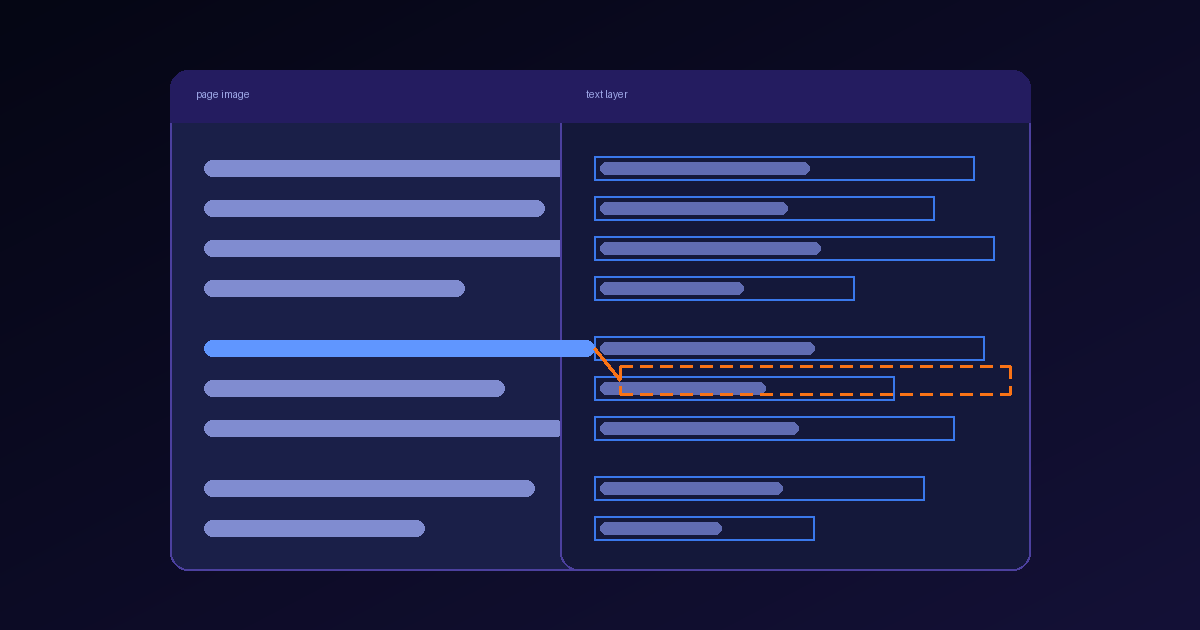
A records team scans a filing cabinet of signed agreements, runs OCR, and stores the output as searchable PDFs. Months later a paralegal searches the archive for a counterparty name and gets eleven hits. The name appears in fourteen files. Nobody notices the three misses, because a search that returns results looks like a search that worked.
Open one of the missing files and the name is right there on the page, perfectly legible. The problem is not the page. A searchable PDF carries two versions of every page: the image a person reads, and an invisible layer of text that search, copy, accessibility tools and downstream software read instead. In those three files the two versions disagree, and the only reader who could have caught it — the human looking at the image — never consults the layer.
This article is about that disagreement: how a text layer drifts from the image it describes, why the file format does not stop it, and how to test for it before an archive becomes the thing a legal hold, an audit or a retrieval pipeline depends on.
Two pages in one file
When an OCR engine produces a searchable PDF from a scan, it keeps the scanned image as the visible page and writes the recognized characters on top of it, positioned where the engine believes each word sits. That text is drawn with text rendering mode 3, which the PDF specification (ISO 32000) defines as neither fill nor stroke: the characters exist in the content stream, occupy coordinates, and paint nothing.
The design is elegant. The page looks exactly like the scan, and every tool that asks the file for text gets text. It also means the file makes two independent claims about the same page, and nothing in the format requires them to match.
- The image — what the page actually looked like when it was captured. Humans read it; almost no software does.
- The text layer — what an OCR pass concluded the page said, and where. Search, copy and paste, screen readers, indexing, extraction and chunking read it; humans almost never see it.
- The link between them — nothing. The file records no fact about whether the two were ever compared.
Every consumer of the file trusts one of the two. The failure that matters is not a bad image or a bad layer on its own. It is a layer that is wrong in a way nobody reading the image would ever discover.
Five ways the layer drifts from the image
Text-layer errors cluster into a small number of shapes. They have different causes and different symptoms, and a single accuracy score blends them into a number that describes none of them.
| Drift | What happened | What the user experiences |
|---|---|---|
| Misread characters | The engine recognized 8 as B, rn as m, or dropped a diacritic. | A search for the correct spelling misses the document. Copied text contains a typo the page does not show. |
| Misplaced words | The characters are right, but their coordinates are offset, scaled or taken from a different page geometry. | Search highlights land on the wrong line. Selecting a paragraph copies its neighbour. |
| Stale layer | The image was rotated, deskewed, cropped or replaced after OCR, and the old layer was kept. | Text looks present and roughly right, but every box is displaced by the same transform. |
| Scrambled order | Multi-column layouts, tables or sidebars were serialized in the wrong sequence. | A phrase search fails because the words are interleaved with a different column. Copied text reads as nonsense. |
| Missing or extra text | A page was skipped, a low-contrast stamp was ignored, or text exists in the layer that never appeared on the image. | Documents are invisible to search on some pages, or match queries for words nobody can see. |
The stale layer deserves special attention because it is produced by ordinary operations. A pipeline that skips OCR on any page that already has text will keep whatever layer arrived with the file, including one written by an older engine on a scan that has since been straightened. Routing pages by what they already contain is sound economics, but only if "a text layer is present" is followed by "and it agrees with the image". Presence is cheap to detect. Agreement is the property you needed.
Why the file format does not catch it
Archiving teams often reach for PDF/A, the ISO 19005 family of standards for long-term preservation (ISO 19005-1:2005 defined the first part). It is a good choice for what it governs. PDF/A constrains a file so that it can be rendered the same way in the future: fonts are embedded, external dependencies are excluded, and the stricter conformance levels require a Unicode mapping so the text can be extracted as characters rather than glyph codes.
Look at what those requirements cover. They describe the structure of the file. A conformance validator can confirm that every character in the layer maps to Unicode, and that the file will render identically in thirty years. It has no way to check that the characters are the ones on the image, because it is not reading the image. A PDF/A file with a perfectly conforming text layer that says Acme Hold1ngs over a scan that says Acme Holdings is a valid PDF/A file.
This is not a flaw in the standard. Preservation and recognition are different problems, and a format specification is the wrong place to certify OCR accuracy. The practical consequence is that conformance is necessary for an archive and says nothing about whether the archive is searchable in the sense your users mean.
Where the disagreement costs something
Most of the time a slightly wrong layer is an inconvenience. It becomes a real cost when some decision depends on the layer and no one re-reads the image before making it.
- Search that defines a review set — in discovery, audit sampling or a compliance sweep, keyword hits decide which documents a person ever opens. A missed hit is a document that was never reviewed, and nothing in the result list says so.
- Redaction by coordinates — tools that locate a value in the layer and black out the matching region will cover the wrong area if the layer is misplaced. The black box sits where the layer says the value is; the value itself stays visible. The broader distinction between a visual mark and a removal is covered in redaction is not anonymization.
- Accessibility — a screen reader reads the layer, not the image. A misread total or a scrambled table is what a blind reader receives as the document.
- Retrieval and extraction — chunkers and parsers that consume the layer inherit every error in it, then cite page regions that may not contain the words they quote.
In each case the error is silent at the moment it matters, and it surfaces later as a question nobody can easily answer: was the document missed because it was irrelevant, or because its layer was wrong?
Test the agreement, not the presence
The useful question is not "is this PDF searchable" but "does the text layer say what the image shows, where the image shows it". That can be measured without a human reading every page, using checks that increase in cost and in what they catch.
1. Coverage
Count pages with no text in the layer and compare against pages with visible ink. A page that renders dense text and yields zero characters is the cheapest failure to find, and in a large archive it is rarely zero.
2. Ink under the boxes
Render each page at a known resolution, take the bounding box of every word in the layer, and measure how much of that box contains dark pixels. Words sitting over blank paper are misplaced. A whole page where most boxes land on white space almost always has a stale layer, and the offset between the boxes and the nearest ink usually reveals the rotation or crop that went wrong.
3. Independent re-reading
For a sample of word boxes, crop the image region and recognize it again with a different engine or a stronger model, then compare the result to the layer's word. Agreement rate by page tells you where misreads concentrate. Disagreements on numbers, names and identifiers matter more than disagreements on common words, so weight them accordingly.
4. Order
Pick phrases that visibly span a line break inside one column and search for them. On multi-column pages, a phrase that fails while each of its words succeeds points at serialization, not recognition.
5. Known-answer queries
Before migrating or re-indexing an archive, build a short list of documents where a person has confirmed that a specific term appears on the image. Run those queries against the layer. The recall on that list is the closest thing to a number that describes what users will actually experience.
None of these checks needs to run on every page forever. Run them on a sample when an archive is created, when an OCR engine or pipeline changes, and on any page a skip-if-text-present rule let through untouched. Keep the results with the batch, so that a later question about a missed document can be answered with a measurement rather than a guess.
What a searchable PDF service should give you
If you are choosing how to produce searchable PDFs rather than auditing ones you already have, several properties make the checks above easier or unnecessary.
- The original image, untouched — the visible page should be the capture itself, so the image remains the reference a layer can be tested against.
- Word-level coordinates you can read — the same positions written into the layer should be available as data, not only buried in the content stream.
- Geometry applied before recognition — rotation, deskew and cropping should happen before the layer is written, or the layer should be regenerated after them.
- An explicit decision about existing text — keeping, replacing or verifying a pre-existing layer should be a stated option, not a silent default.
- Structured output from the same read — when extracted fields and citations come from the same pass that produced the layer, a disagreement between them is visible instead of hidden in two pipelines.
That last point is the one most teams reach last. Searchable PDFs from scans describes producing an OCR text layer while preserving the original visual file, alongside JSON with citations, tables and validation from the same document job. The value of doing both in one pass is not only fewer pipelines. It is that the human-readable file and the machine-readable evidence share one reading of the page, so there is one set of coordinates to check rather than two that can quietly diverge. For the adjacent measurement of how well a parser preserves tables and reading order, see layout fidelity as a parsing metric; this article is narrower, and concerns only whether the delivered file agrees with itself.
One file, two claims, one test
A searchable PDF is a promise that two representations of a page say the same thing. The image keeps its side of the promise by default, because it is the capture. The text layer keeps its side only if something checked. Format conformance will not do it, and a search that returns some results will not reveal it.
Treat the layer as a derived artifact with an accuracy you can measure: coverage, ink under the boxes, independent re-reading, order and known-answer recall. Record the numbers with the batch. The archive will still contain errors, but they will be errors you can size, instead of documents that quietly stopped existing for anyone who searches.